Reading optical signal levels
Every ONU reports how much light it receives. The panel reads these values from the OLT, colours them and keeps a history. This page explains what the numbers mean and what to do when they are bad.
ONU Rx and OLT Rx
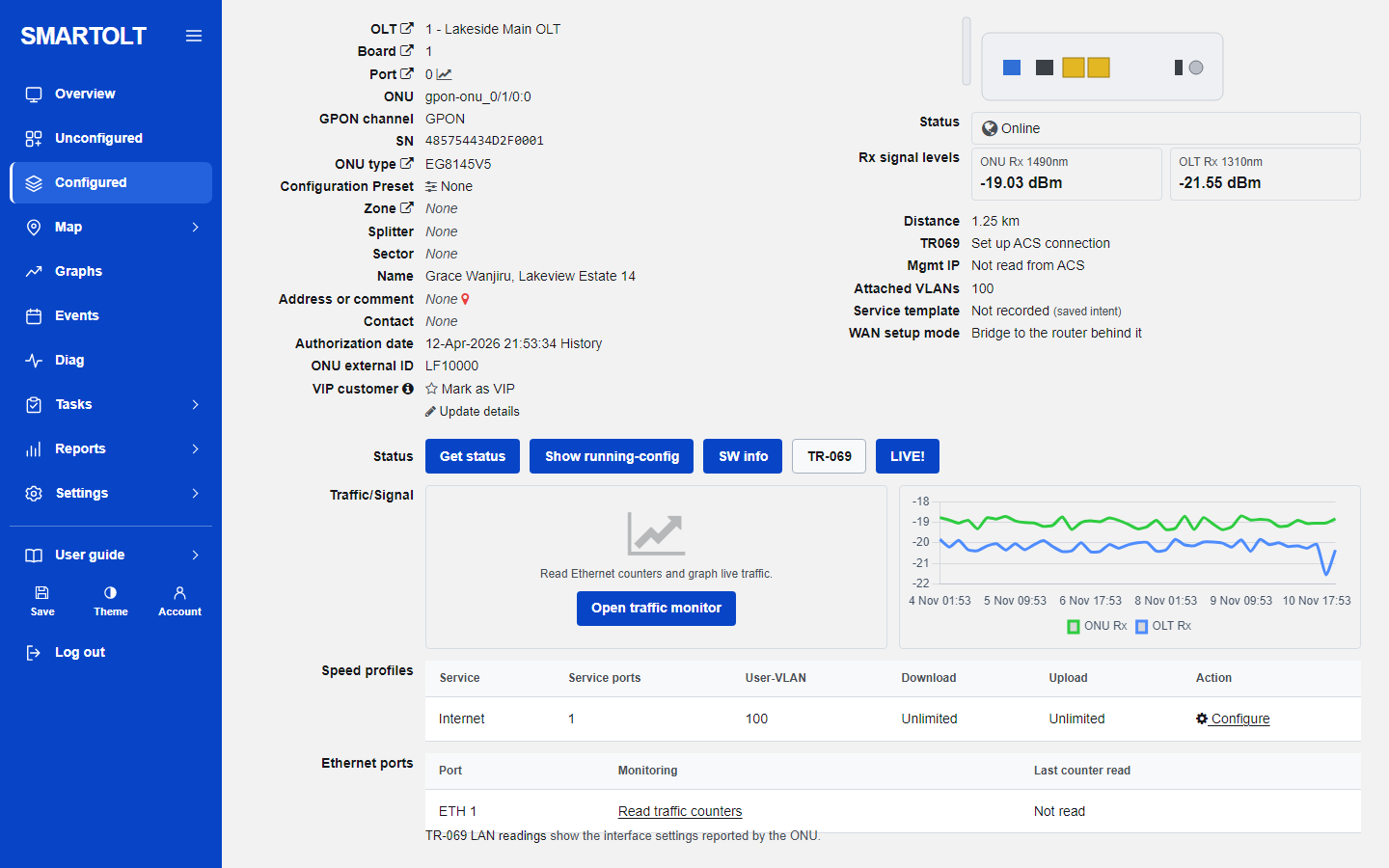
Open an ONU from the Configured list. The row Rx signal levels shows two values:
| Label | What it measures |
|---|---|
| ONU Rx 1490nm | The light the ONU receives from the OLT. This is the downstream direction, at the customer's end of the fibre. |
| OLT Rx 1310nm | The light the OLT receives from this ONU. This is the upstream direction, at your end of the fibre. |
Both are in dBm. The values are negative, and a number closer to zero means more light. So -19 dBm is a stronger signal than -26 dBm. Every 3 dB of loss means that half of the light is gone.
The panel reads the levels over Telnet during each read of the OLT, every 5 minutes. An ONU that is offline has no signal value and shows a dash. On the ONU page, press Get status to read the ONU again now.
The levels the panel uses
The panel judges the ONU Rx value. The limits are the same for every OLT and cannot be changed.
| Level | ONU Rx | Meaning |
|---|---|---|
| Good | From -25 dBm up to -8 dBm | Normal. Nothing to do. |
| Warning | Below -25 dBm, down to -27 dBm | Close to the limit. The ONU works, but a small extra loss will make it drop. |
| Critical | Below -27 dBm | Too weak. Expect drops, errors and slow service. |
| Critical | Above -8 dBm | Too strong. The light is too much for the ONU's receiver. |
The OLT page shows the two lower limits in its details table, as Signal RX level "warning" (dBm) with -25 and Signal RX level "critical" (dBm) with -27.
OLT Rx is shown for your information. The panel does not colour it and raises no alarm on it.
Where you see the levels
- Overview. The Signal attention card counts ONUs with a warning or critical signal. Click it to open the list.
- Configured. The Signal column shows the ONU Rx value in the colour of its level. Three signal icons above the list filter by Good signal, Signal warning and Signal critical. Click the Signal column heading to sort by signal.
- Diag. This list shows Rx ONU and Rx OLT side by side with the distance, and has the same signal filters.
- An OLT page, PON ports tab. The columns Average signal and Weakest show the level per PON port.
- Events. The alarm PON signal opens when three or more ONUs on one PON port have a critical signal. It closes when fewer than two are left. See Alarms and events.
- Overview, Signal variations. This lists ONUs whose light is now 3 dB or more below their own average of the last 7 days. It catches a fibre that got worse even when the value is still in the good range.
Typical causes of a weak signal
| Cause | How it looks | What to do |
|---|---|---|
| Dirty or damaged connector | One ONU is weak. Often it got worse right after someone unplugged and replugged the fibre. | Clean both connector ends and the adapter with a proper fibre cleaner. Replace a scratched patch cord. |
| Bent or squeezed fibre | One ONU dropped by several dB at a clear moment in the graph. Common after furniture was moved or a cable was stapled or tied too tight. | Follow the drop cable. Remove tight bends, tight cable ties and kinks. |
| Bad splice | The ONU was weak from the day it was installed. | Redo the splice or the field connector. |
| Too much splitter loss | All ONUs behind one splitter are weak by a similar amount. | Check the split ratio and the number of splitters in the path. Each time the light is split in two it loses about 3.5 dB, so a 1:8 splitter costs about 10.5 dB and a 1:32 about 17.5 dB. |
| Long distance | ONUs far from the OLT are weaker than near ones. The ONU page shows the Distance. | Fibre loses a fraction of a dB per kilometre, so distance alone is rarely the cause. Look for too much splitting or bad joints along the route. |
| Problem on the feeder or the PON port | Every ONU on one PON port is weak, or got weaker at the same time. | Check the feeder fibre, the first splitter, the patch cord at the OLT and the optical module of the PON port. |
Signal too strong (above -8 dBm). This happens when an ONU is very close to the OLT with little or no splitting, for example on a test bench. Add an optical attenuator or put the ONU behind a splitter.
Compare neighbours. If one ONU is weak and the others on the same splitter are fine, the fault is in that customer's drop or connector. If all ONUs on a splitter or a PON port are weak, the fault is upstream of them. Recording splitters in the panel makes this easy. See Zones and splitters.
Weak signal is not the same as LOS
A weak signal means the ONU is online with little light. Signal loss (LOS) is a status: the light to the ONU is gone completely, usually a cut or badly bent fibre. Power fail means the ONU lost electrical power. An offline ONU has no signal value at all, so look at its status and at the last value in the graph before it went offline.
What the signal graph tells you
The ONU page has a signal graph in the row Traffic/Signal. It draws two lines, ONU Rx in green and OLT Rx in blue, for the last 7 days. The panel stores one point per ONU about every 15 minutes and keeps signal history for 30 days. For a newly authorized ONU you see Signal graph fills in as the OLT is read every 5 minutes. until there are enough points.
Use the shape of the lines to find the cause:
- A flat line. The fibre path is stable. If it is flat but weak, the loss was there from the start: splitters, distance or a bad joint.
- A sudden step down that stays. Something happened at that moment: a bend, a damaged cable, a connector that was unplugged and put back dirty. Ask what was done at that time.
- A slow fall over days. A connector that is getting dirty, water in a closure, or a cable under growing stress.
- Jumping up and down. A loose connector or a cable that moves, for example in the wind.
- Gaps. The ONU was offline or the OLT could not be read at that time.
- Both lines fall together. The loss is in the fibre path, which both directions share.
- Only one line falls. Suspect the equipment at one end: the ONU if only OLT Rx falls, the PON port's optical module if only ONU Rx falls on many ONUs.
More graphs are described in Graphs and reports, and the ONU page in ONU details.
If something goes wrong
- The signal shows a dash. The ONU is offline, or the OLT did not give an optical reading for it. Check the ONU's status.
- The values look old. Check Last read on the OLT. If the OLT is not being read, see When an OLT will not connect.
- The graph is empty. It needs at least two stored points. A new point is stored about every 15 minutes while the ONU is online, so wait a little and reload the page.
Still stuck? Write to us and include your site name. No panel yet? Create one for free.