Alarms and events
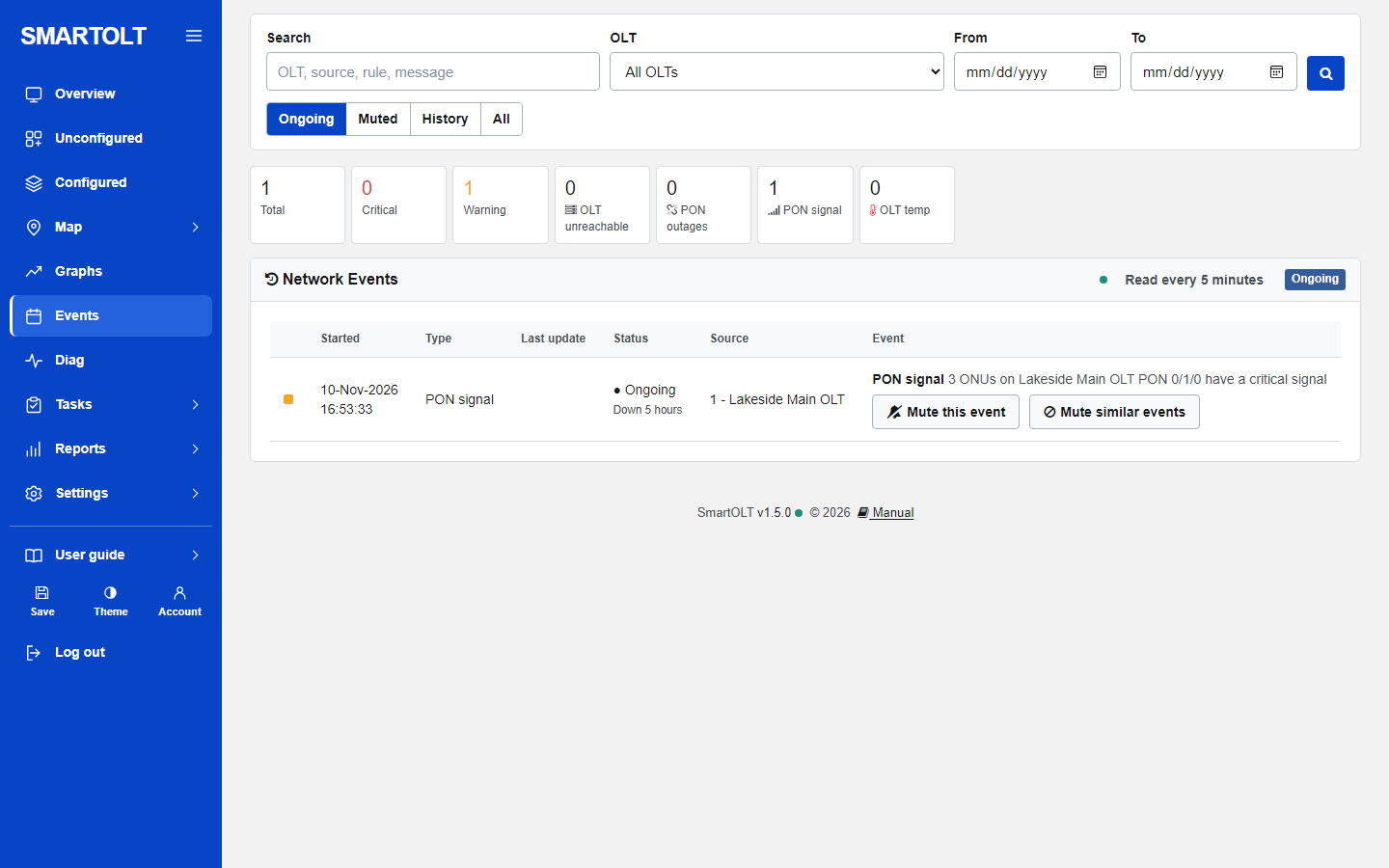
The panel watches your OLTs and opens an alarm, called an event, when something goes wrong. Each event closes by itself when the problem is gone. You do not open or close events by hand. Click Events in the side menu to see them.
When events are checked
Events are checked each time the panel reads an OLT. This happens every 5 minutes, and also when you press Refresh on an OLT. So an event can open or resolve up to 5 minutes after the real change in the network.
The PON and temperature rules run only after a successful read. While an OLT cannot be read, its PON and temperature events stay as they are. They are checked again at the next good read.
The alarm types
| Event | Severity | Opens when | Resolves when |
|---|---|---|---|
| OLT unreachable | Critical | Two reads in a row fail because the OLT does not answer (no connection, or the VPN tunnel is down). It opens at once, on the first failure, when the OLT refuses the login or the device is not a supported OLT. | The next read of the OLT works. |
| OLT read failing | Warning | The OLT answers, but three reads in a row fail for another reason. | The next read of the OLT works. |
| PON outage | Critical | A PON port has two or more ONUs, every one of them is offline, and at least one reports loss of signal (LOS). | A good read finds that this is no longer true, for example one ONU on the port is online again. |
| PON signal | Warning | Three or more ONUs on one PON port have a critical signal: below -27 dBm, or above -8 dBm. | Fewer than two ONUs on the port have a critical signal. |
| OLT temperature | Warning from 70 degrees C. Critical at 80 degrees C or more. | The control board of the OLT reports 70 degrees C or more. | The temperature is below 67 degrees C. |
Some notes on these rules:
- PON signal opens at three ONUs but closes only below two. OLT temperature opens at 70 but closes only below 67. This gap stops an alarm from opening and closing again and again when a value moves a little.
- A PON outage on a port usually means a cut in the feeder fibre. A port where all ONUs are down with power fail only, and none with LOS, does not open a PON outage. That is normally a power cut.
- If an OLT that was unreachable starts to answer but the read still fails, the "OLT unreachable" event resolves. If the reads keep failing, "OLT read failing" opens after the third failed read.
- While an event is ongoing, the text of the event is updated at each read, for example with the latest error or the latest number of ONUs.
To find the cause of a connection alarm, read Connection troubleshooting. For signal alarms, read the optical signal guide.
The counters at the top
The tiles count the events that are ongoing and not muted:
- Total, Critical and Warning.
- OLT unreachable: OLT events. This tile also counts "OLT read failing".
- PON outages, PON signal and OLT temp.
The open alerts number on the Overview is the same as Total here.
The tabs: Ongoing, Muted, History and All
| Tab | Shows |
|---|---|
| Ongoing | Events that are still open and not muted. This is the tab you see first. When it is empty, the page says "No ongoing events. Everything SmartOLT watches is fine." |
| Muted | Every event you muted, open or resolved. |
| History | Events that are resolved. |
| All | Every event. |
Ongoing events are listed first, then critical ones, then the newest. A list shows up to 500 events.
Reading the list
| Column | What it shows |
|---|---|
| Coloured square | Red for critical, orange for warning. |
| Started | The date and time the event opened. |
| Type | OLT, PON outage, PON signal or OLT temp. |
| Last update | The date and time the event resolved. Empty while it is ongoing. |
| Status | Ongoing with "Down" and how long, or Resolved with "After" and how long it lasted. A Muted label is added for muted events. |
| Source | The OLT the event is about. "Removed OLT" means the OLT was deleted from the panel later. |
| Event | The title and a sentence with the detail, for example the OLT name, the PON port and the number of ONUs. |
Search and filter
- Type a word in Search. It looks in the event title, the event text and the OLT name.
- Choose one OLT in OLT, or leave it on All OLTs.
- Set From and To to see only events that started between two dates.
- Click the green search button. The filters stay when you change tab.
Muting events
Mute an event when you know about the problem and do not want it in your counters. For example, a PON port in an area that is being rebuilt. A muted event is not deleted. It moves to the Muted tab and no longer counts in the tiles or in the open alerts on the Overview.
| Button | Where you see it | What it does |
|---|---|---|
| Mute this event | On ongoing events that are not muted. | Mutes this one event. |
| Mute similar events | On every event that is not muted. | Mutes this event and every other event of the same kind on the same thing, for example every "PON signal" event of the same PON port, old ones included. |
| Unmute | On muted events. | Unmutes this event and all similar events. |
A muted alarm stays muted when it opens again. If you mute a "PON outage" on a port and the same port goes down next month, the new event starts muted and you will not see it on the Ongoing tab or in the counters. Open the Muted tab and click Unmute when the known problem is fixed.
What is not an event
One ONU going offline does not open an event. To follow single ONUs, use the Diag page or the "ONU status changes" report in Graphs and reports. The Overview also lists PON ports with several power fails or LOS under "PON & signal watch".
Still stuck? Write to us and include your site name. No panel yet? Create one for free.